Friday night, a pile of timesheets
Attendance on paper, hours in Excel, materials in the foreman's head. You build the invoice from three sources, and one of them is definitely wrong.
The phone recognises the site and logs attendance. Every point on the plan has a status and a photo from before the wall was closed. Partner companies see what they need. Invoicing in one click.
Registration opens at the end of October 2026. Early sign-ups get the trial extended to 60 days.
Most field companies don't have a problem with the work. They have a problem with everything around it.
Attendance on paper, hours in Excel, materials in the foreman's head. You build the invoice from three sources, and one of them is definitely wrong.
You have six sites and twenty people. Do you know who's where? Exactly? And at 7:35, do you know who didn't turn up at all, or do you find out at ten when the foreman calls?
An attachment is missing, the hours don't match the invoice, the materials aren't in any document. Meanwhile you're standing inside a distribution board.
Where does the socket go? What height? Which type? The answer is pencilled on a wall that gets painted tomorrow.
You were due on Tuesday. The bricklayer didn't know, the drywall is up. Two companies, two schedules, zero shared information. And now you're arguing about who pays for it.
The socket in office 214 is dead. Who installed it? Where does the cable run? Which port is the data socket next to it on? The person who knew has left the company. Time to break the wall open.
WiseBuilder was born in an electrical installation company that had exactly these problems. Not in an office where someone wrote them down.
Every feature exists because something specific annoyed someone in the field. Here are the ones that annoy people most.
Someone out there has the other features. These three we couldn't find anywhere, so we built them.
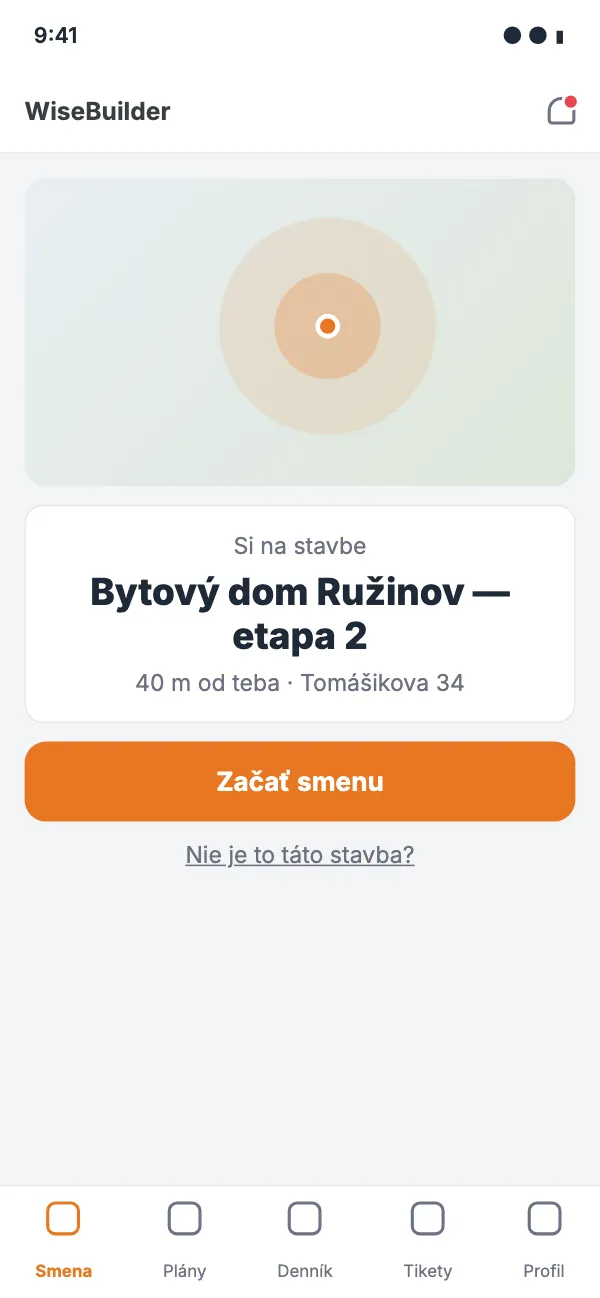
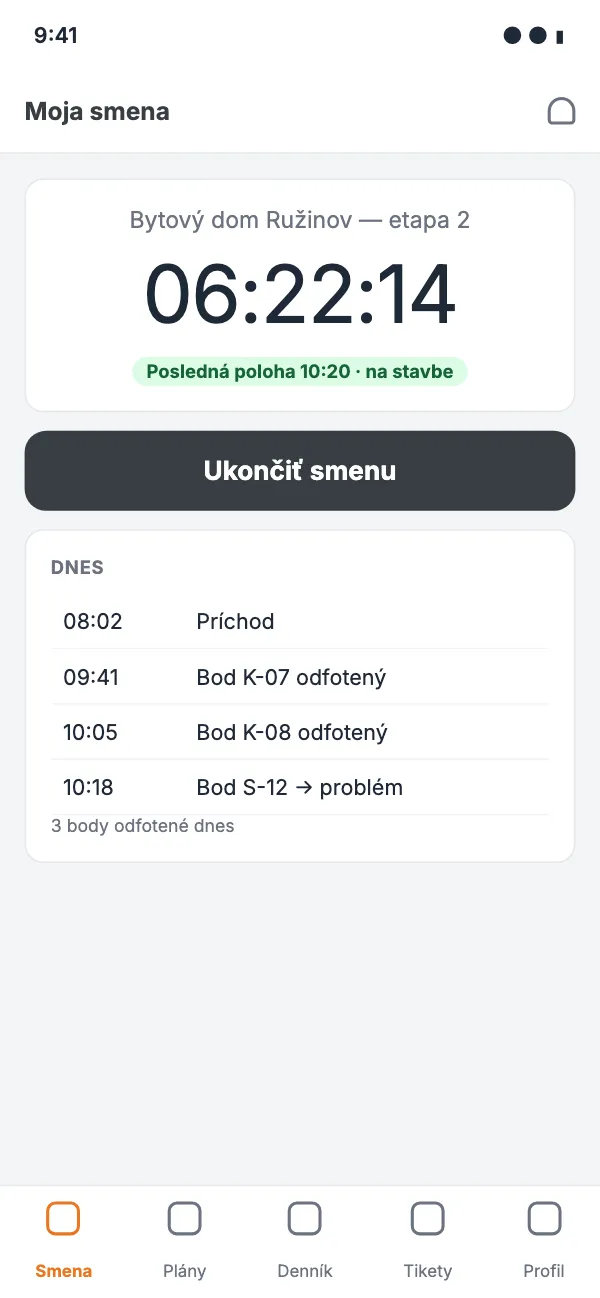
A worker arrives on site, opens the app, and it already knows where he is. Every project has GPS coordinates and a radius, so the system assigns the right site by itself. No scrolling through lists, no "sorry, tapped the wrong one". The hours match the project before the worker has even started.
Monday, 6:58. Peter Kováč gets out of the van in Ružinov and opens the app. "You're at Bytový dom Ružinov — etapa 2, 40 m away. Start shift?" Tap. Done. In the office you see it two seconds later, without anyone having to message you.
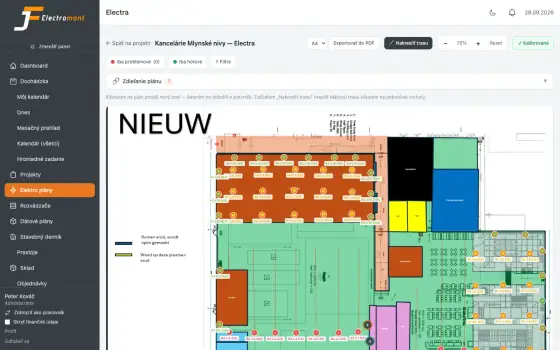
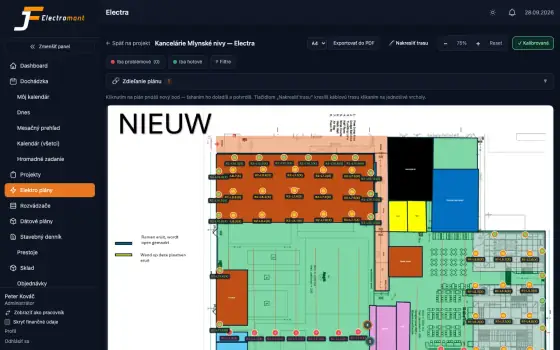
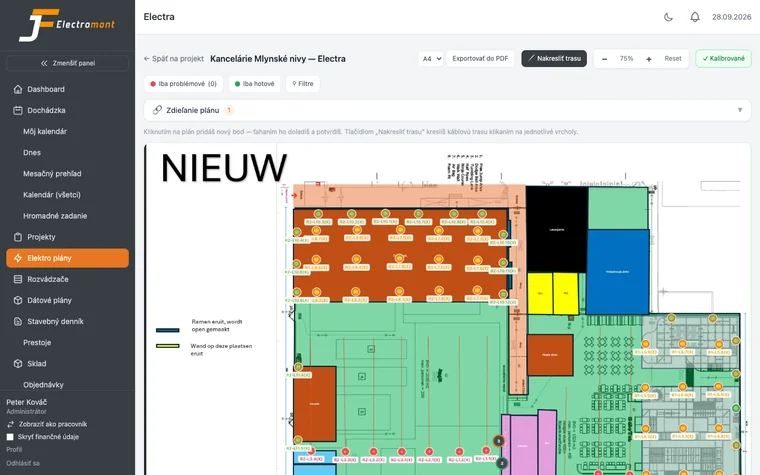
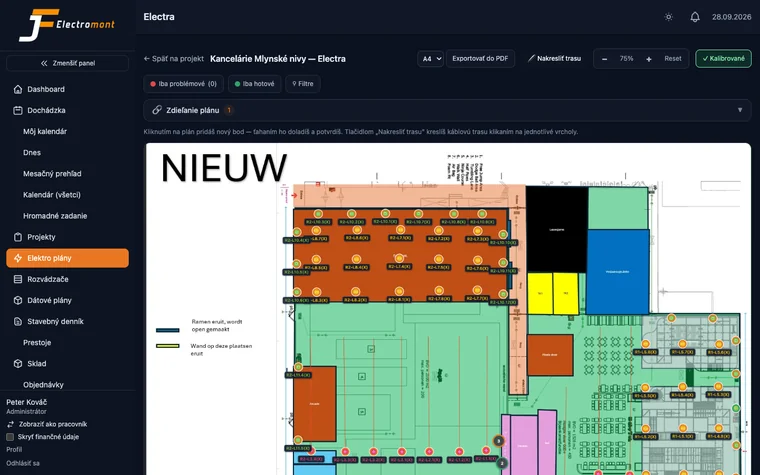
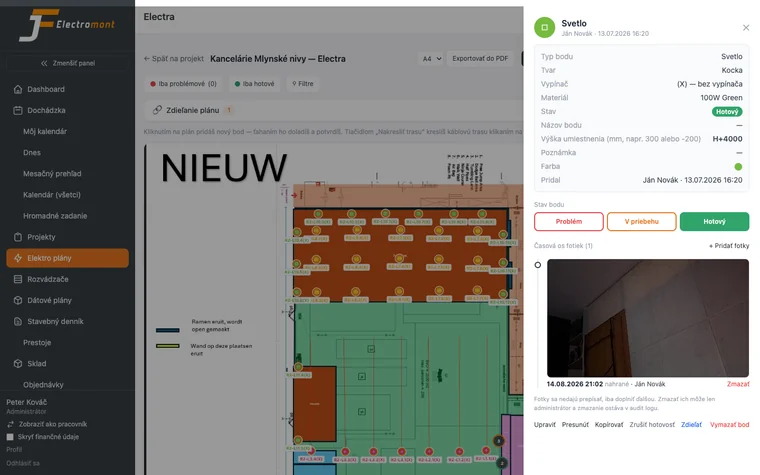
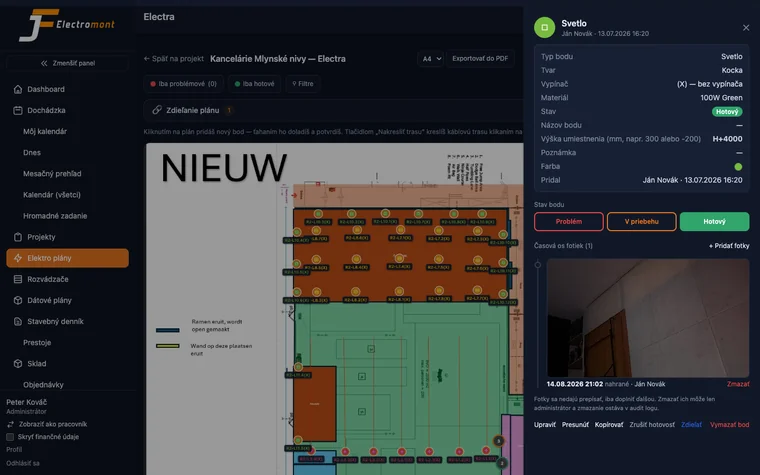
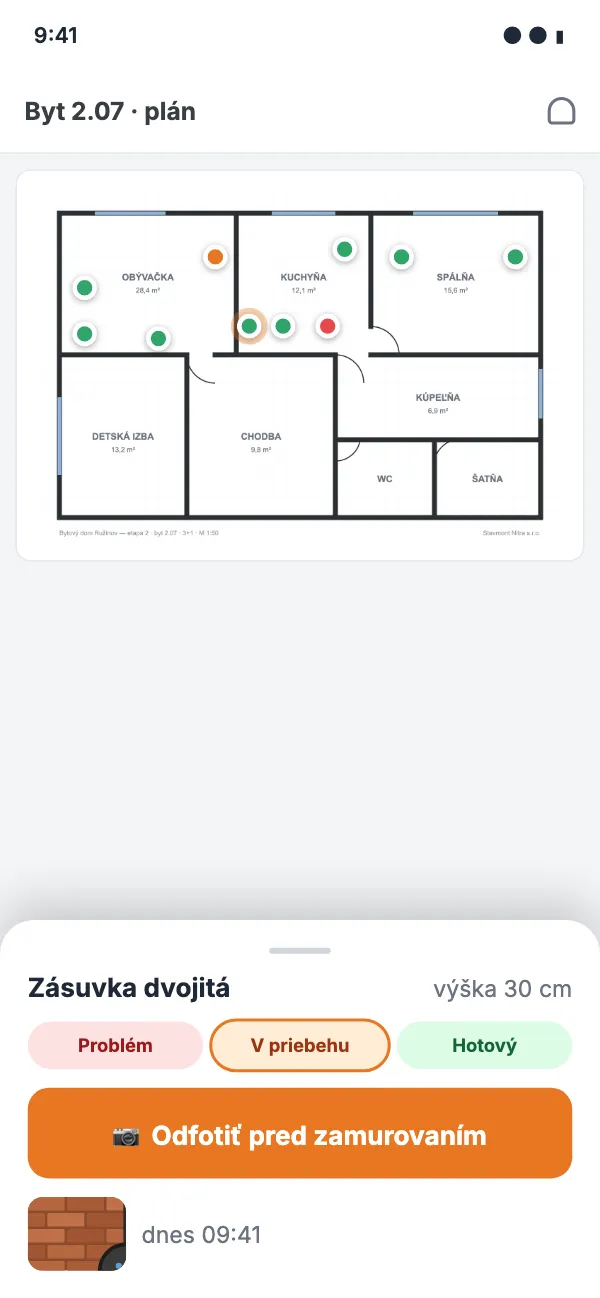
Upload a PDF floor plan. On site, the electrician taps where the socket, light, switch or data point is, and adds the height, type and product number. Every point has a status: problem, in progress, done. And to every point you attach timestamped photos. Shell and core. Cable in the chase before plastering. Back box before the wall is closed. Finished socket after fit-out. Five years later someone taps the same point and sees what's behind the wall. Without breaking it open.
The year is 2031. Office 214, dead socket. The service tech opens the plan and taps the point. He sees: double socket, circuit L3 from board R2, 16 A circuit breaker, Gira System 55. And a photo from 12 March 2026: cable in the chase, 30 cm from the corner, before plastering. No breaking walls. No calling Peťo, who left the company years ago.
Why it matters: for inspections, testing and service call-outs, it's evidence that can't get lost. The client doesn't have to trust that you did it right. They tap and see.
The first platform that connects the whole supply chain on site around a single source of truth.
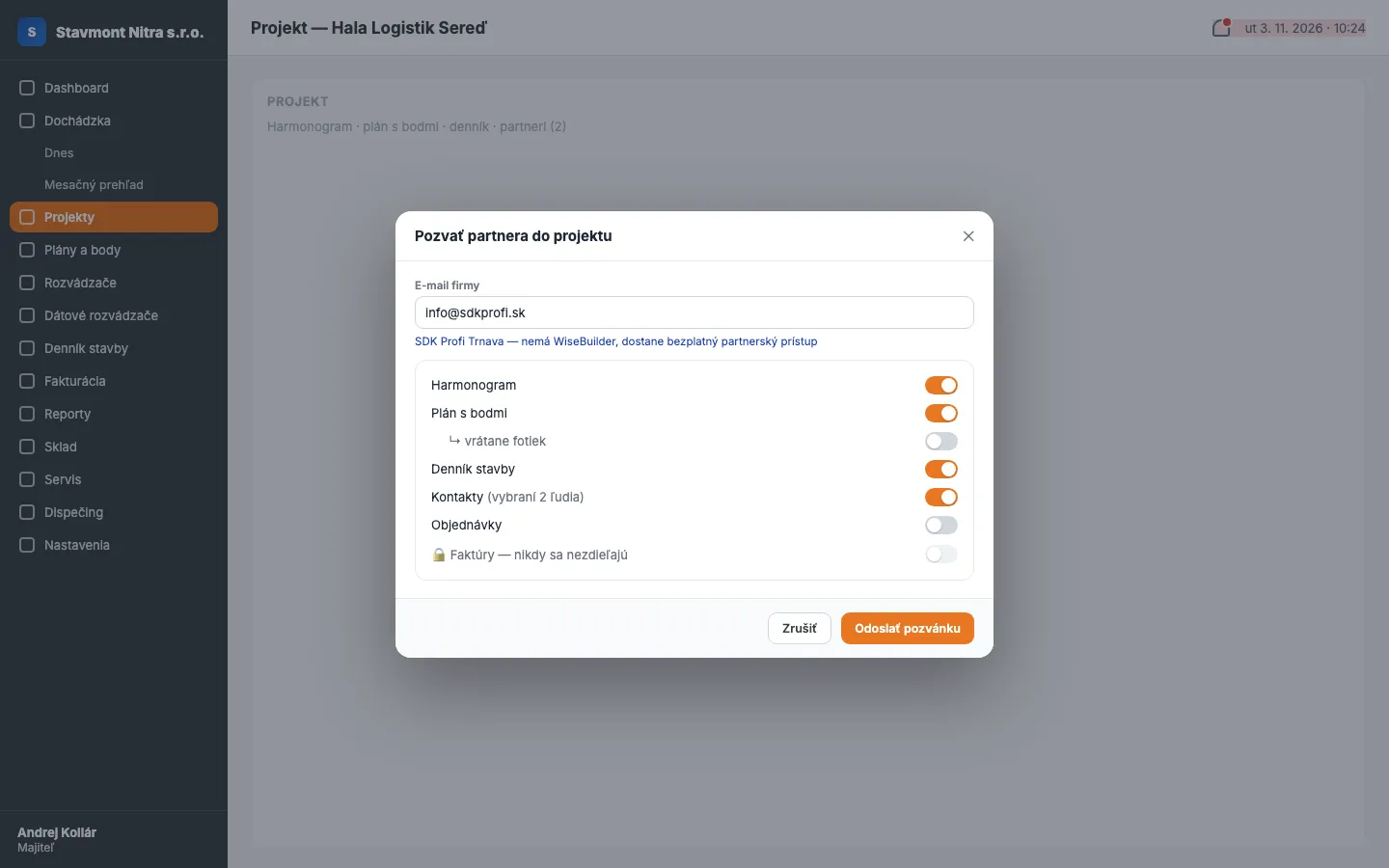
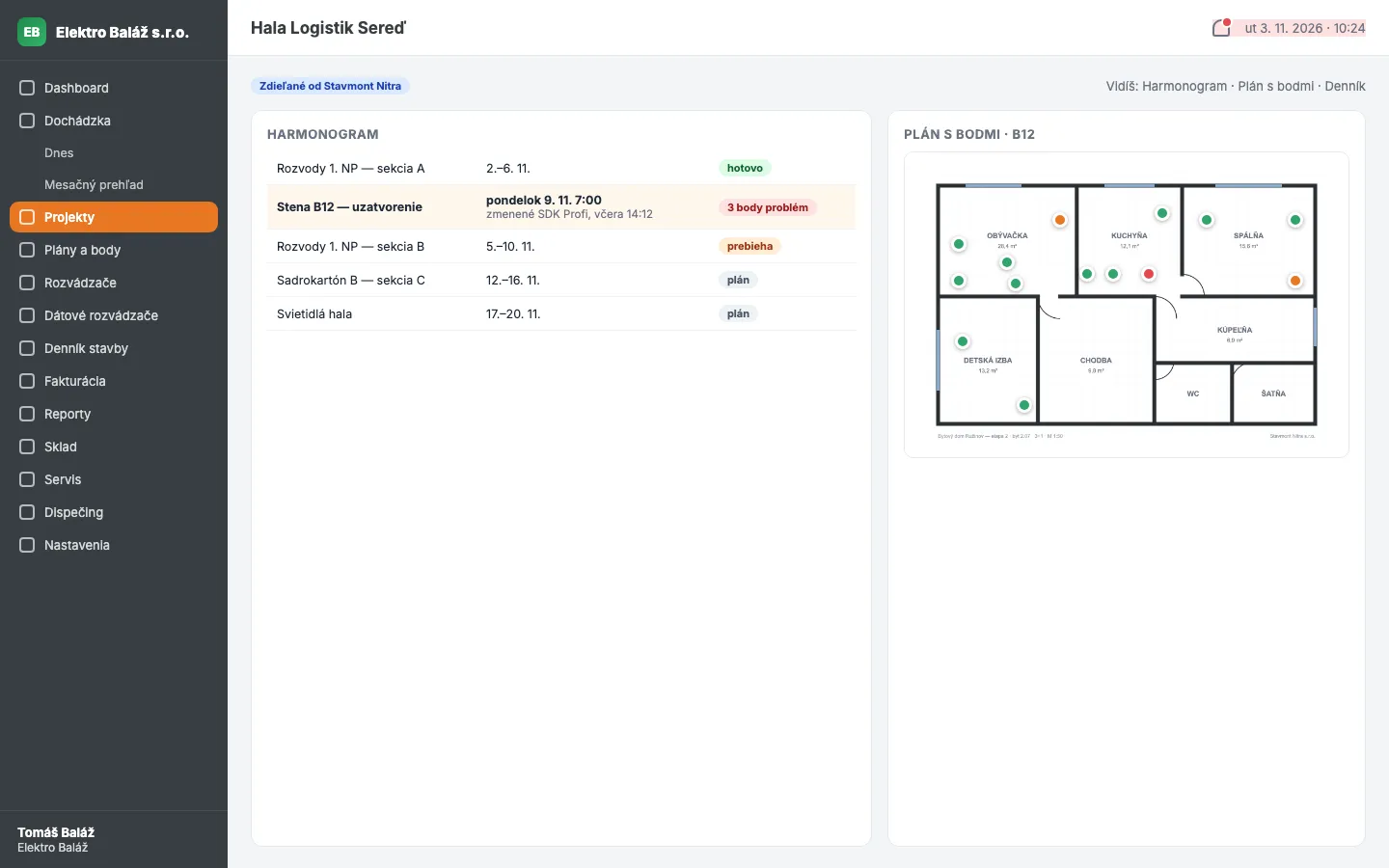
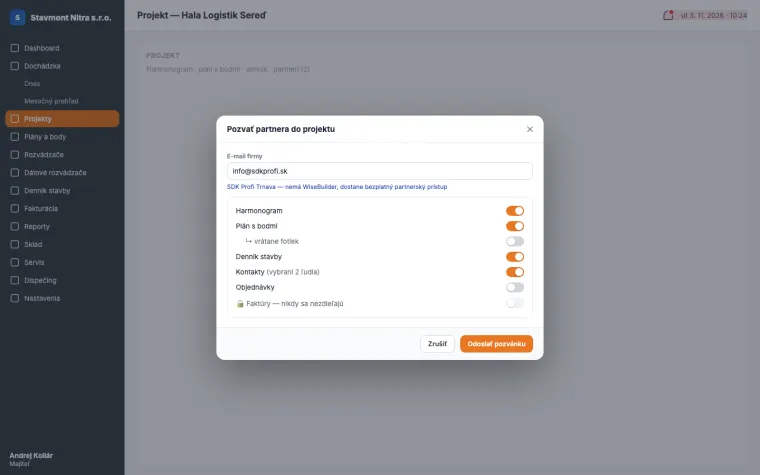
You're not alone on site. The bricklayer needs to know when you're coming to pull cables. You need to know when he's closing the wall. The plumber needs your plan so he doesn't run a pipe through your distribution board. Today that happens over phone calls and a photo in Messenger that nobody can find a week later. In WiseBuilder you invite the partner company into the project, and everyone sees exactly what they need. Nothing more.
Hala Logistik Sereď. General contractor Stavmont invites an electrician, a plumber and a drywall installer. The electrician shares the plan with points, the drywall installer shares the wall-closing schedule. On Thursday the drywall installer moves wall B12 to Monday. The electrician gets a push: "Wall B12 closes Monday 7:00, 3 points in problem status." The cables are in on Friday. Nobody breaks anything open, nobody has to call.
The foundation everything else depends on. Hours match the project, the invoice matches the hours.
Hours go straight onto the project the worker is standing on. You don't need to message him in the morning where to go, and he doesn't have to pick anything. If he moves to another site during the day, the app records it and splits the hours between both projects.
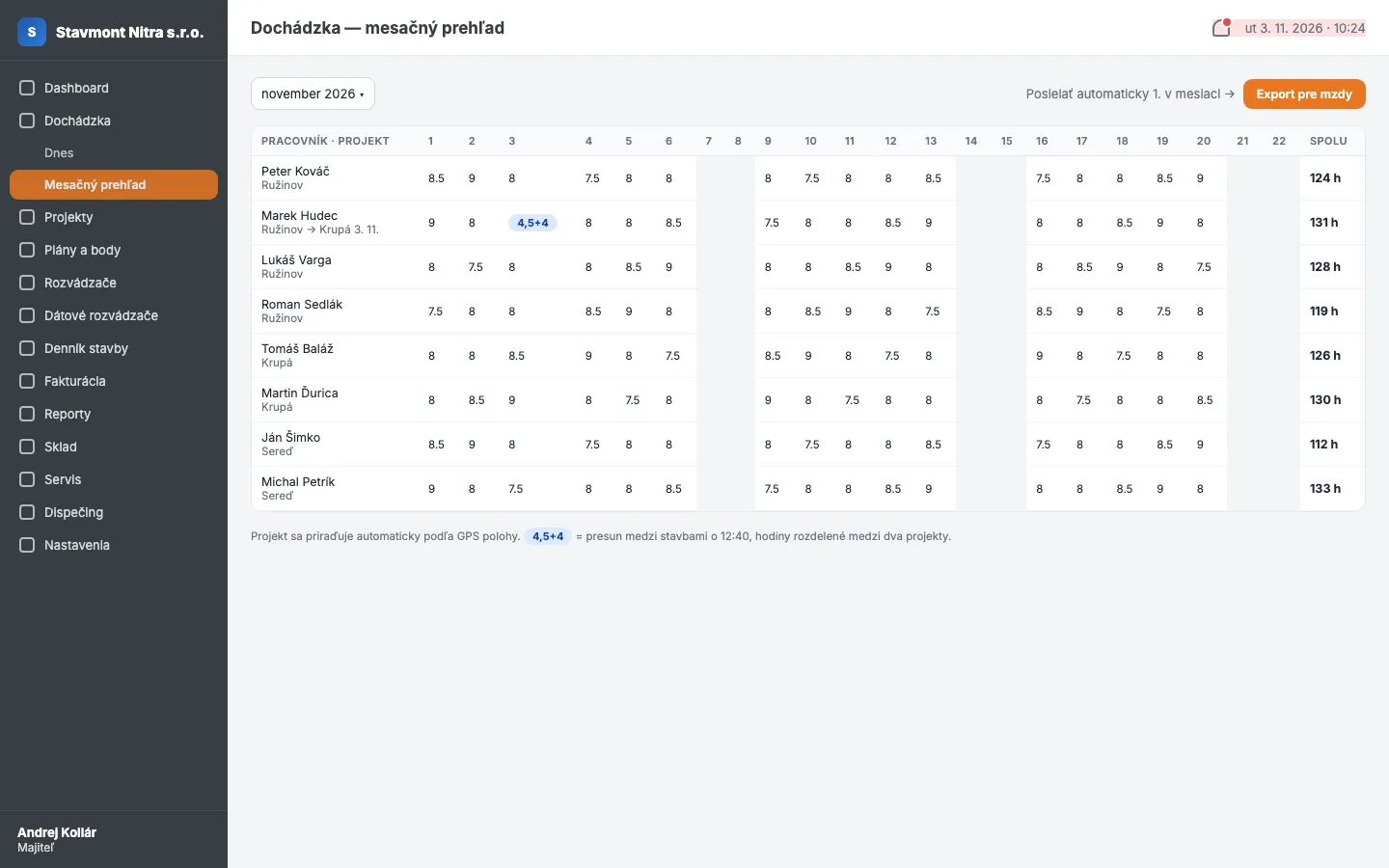
While a shift is running, the app saves the location every 10 minutes. You see whether the worker was on site all day or left an hour early. Once the shift ends, tracking switches off — nothing more, nothing less. It isn't spying: an honest worker has proof he was there, and the company has proof for the client.
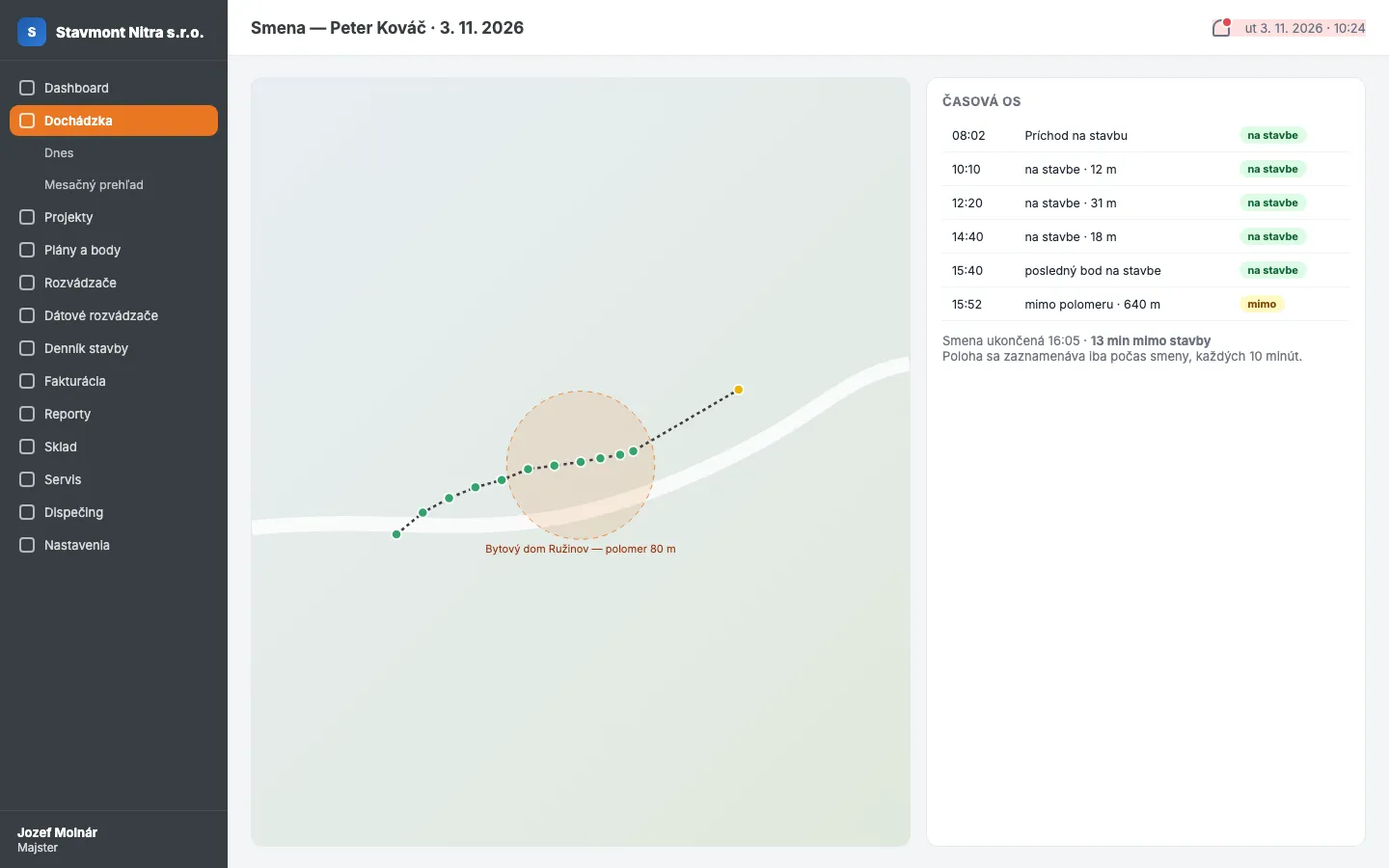
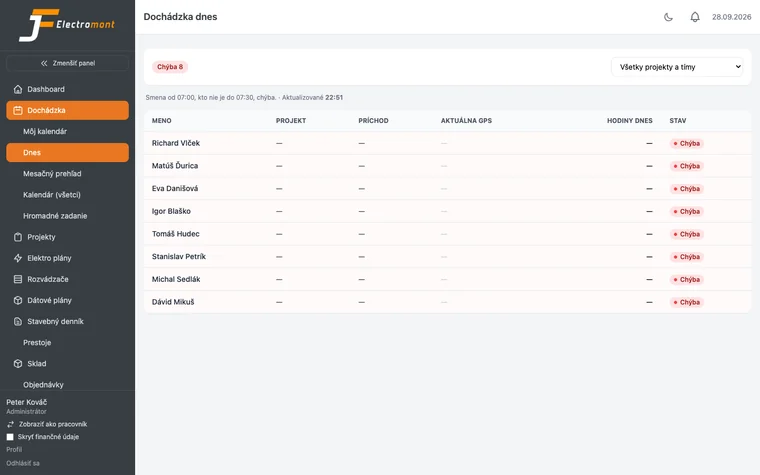
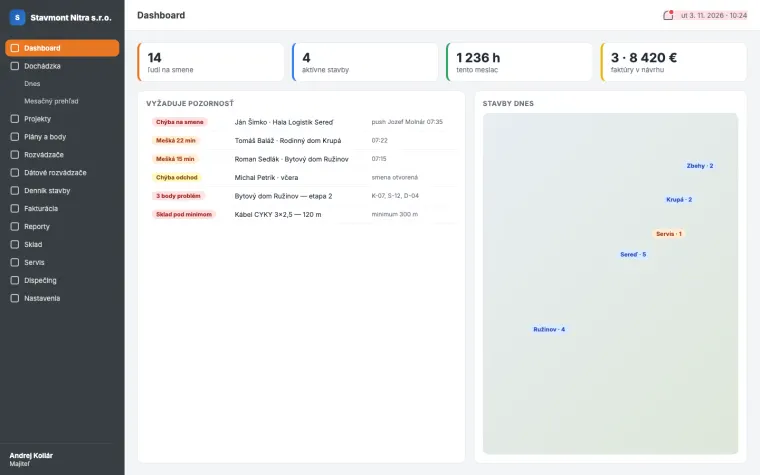
Who's at work today, where, since when. Who's late, who forgot to clock out, who's on overtime. The manager sees it in one table without calling a single person. The monthly timesheet is ready the day you need it, not a week later. And whatever you can't see because you're on site comes to you as a notification.
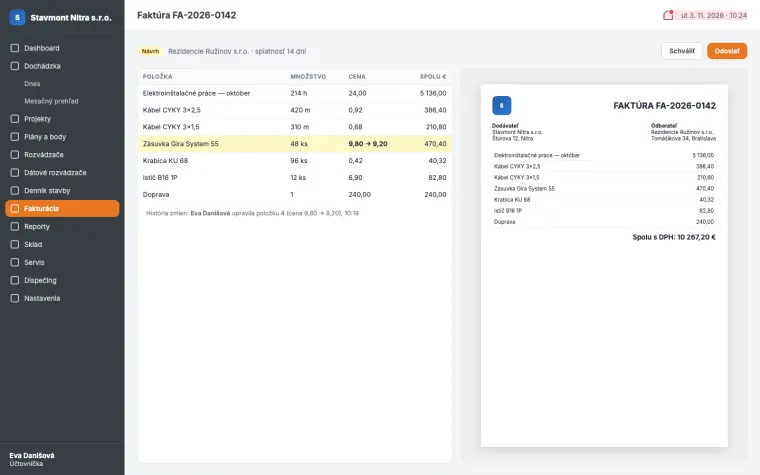
Hours worked are in the system. Materials for the project are in the system. You put the invoice together in one click without retyping anything. Rates per worker or per project, VAT, payment terms, numbering — set it once and let it run.
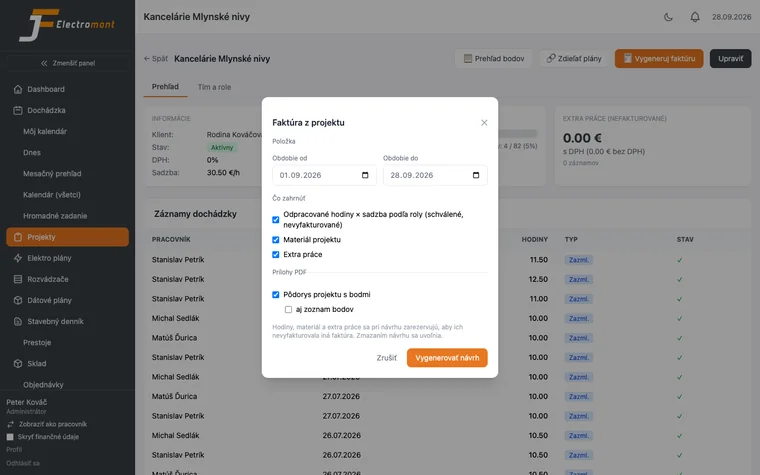
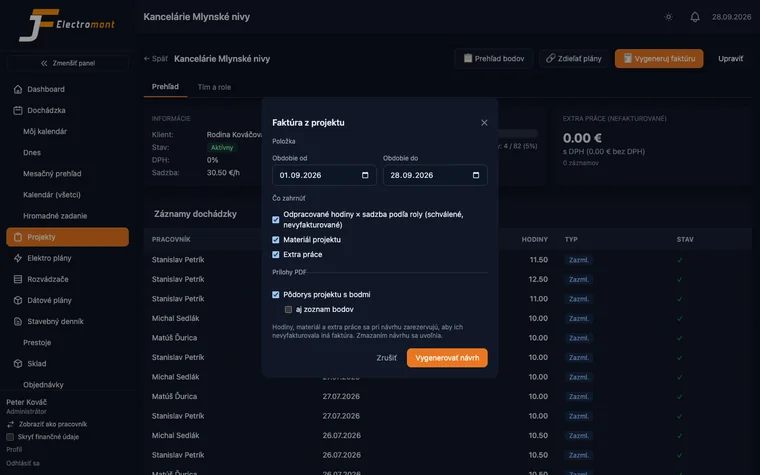
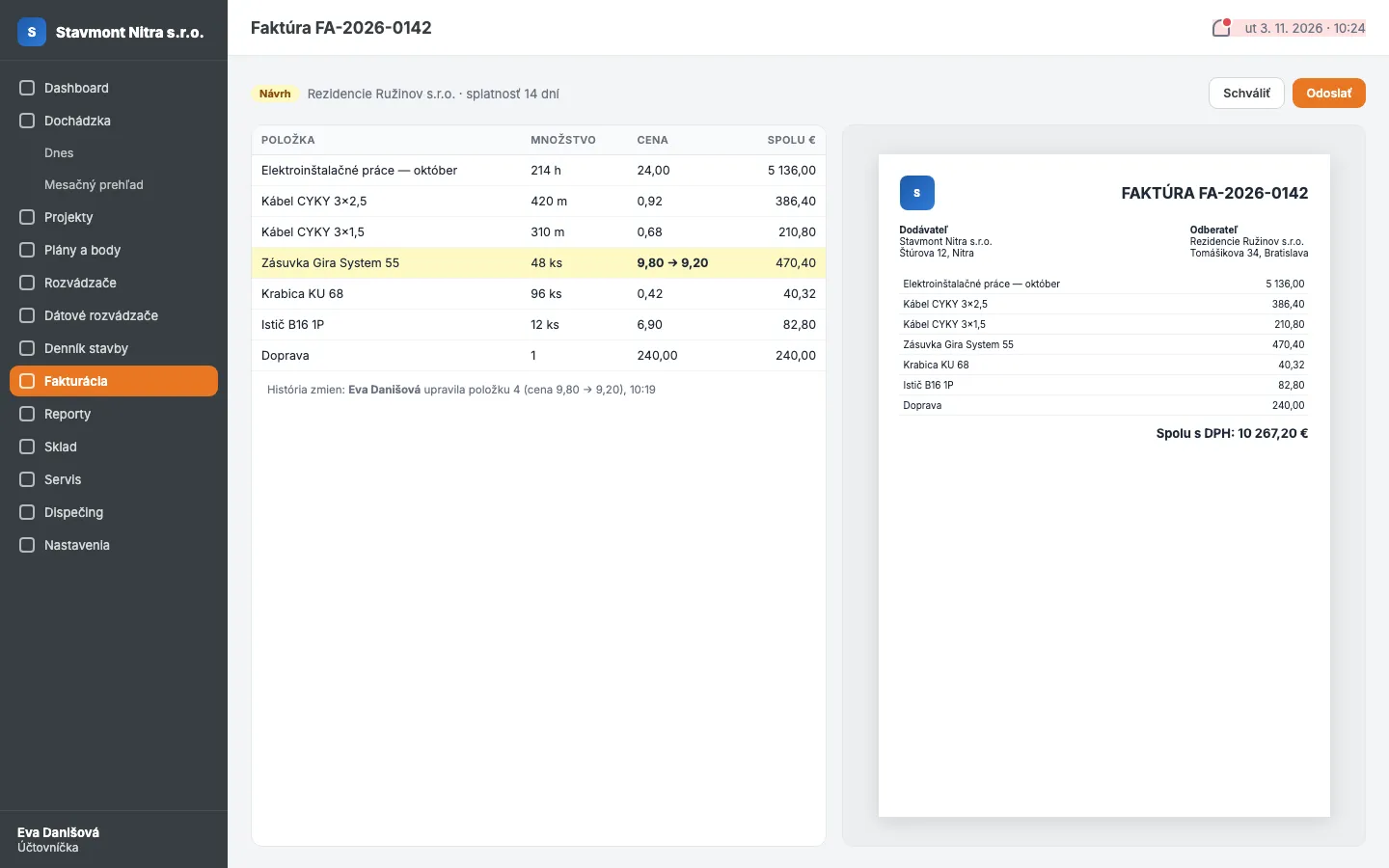
The system generates the invoice but doesn't send it. You or your accountant open the preview and change anything: an item, a price, the wording, the due date. Only then do you tap "Send". Every change is logged, so you know what was changed and who did it.
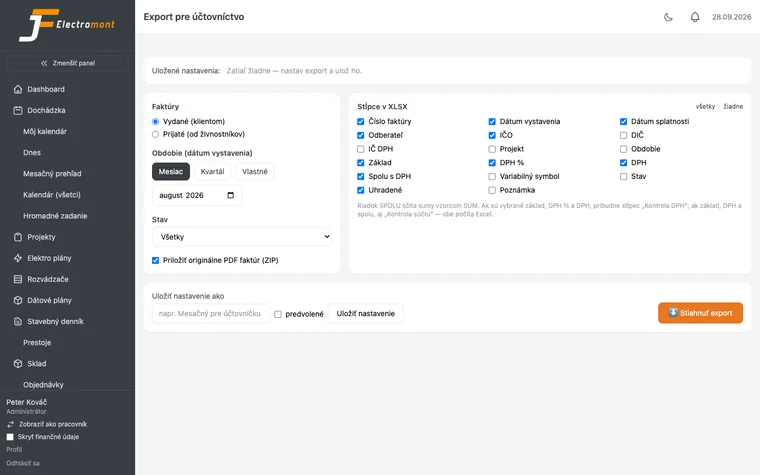
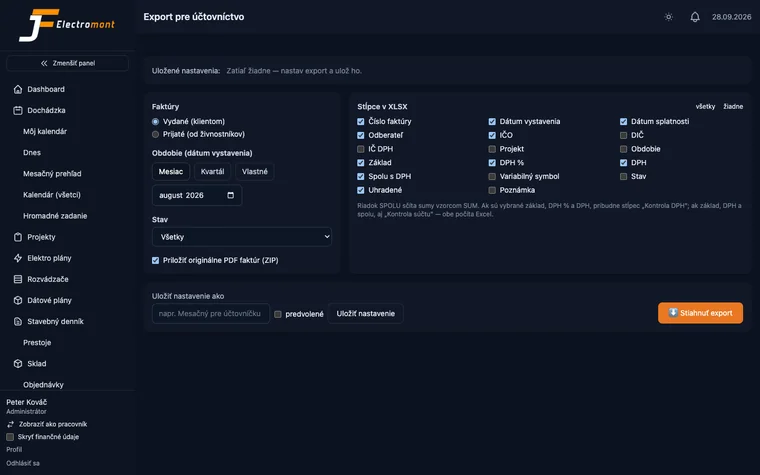
Your accountant has her own system and doesn't want to learn another one. She doesn't have to. You give her an XLSX or CSV export in a structure you set up once. Invoice attachments come along, so she doesn't have to hunt for anything. And if you don't want to think about it even once a month, set up an automatic report and it arrives on its own.
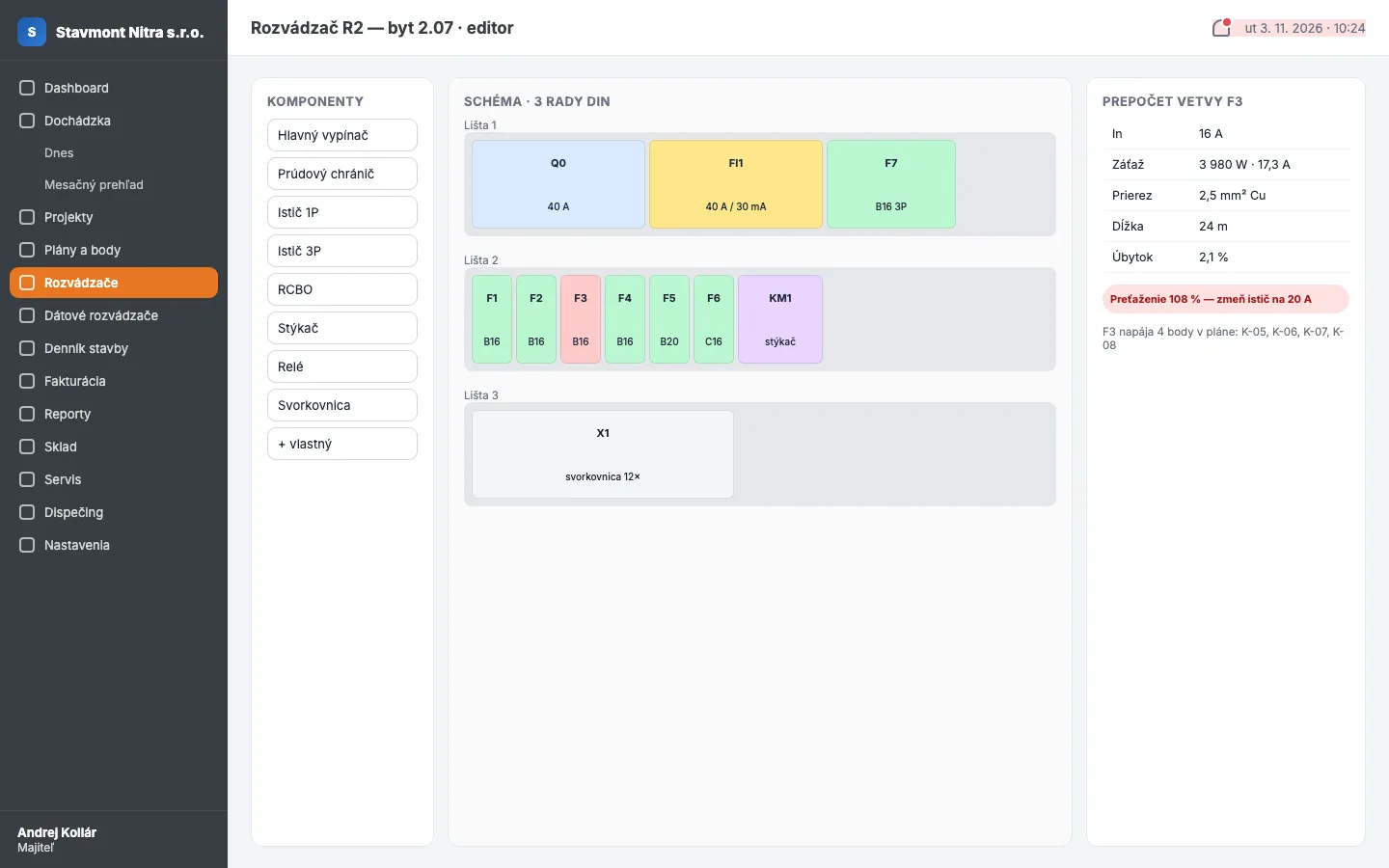
The system was born in an electrical installation company. That's why electrical goes deepest here: from a point on the plan, through the distribution board, to the inspection & testing PDF. And from an RJ45 socket to its port on the patch panel.
A visual editor where you assemble the distribution board from components: circuit breaker, RCD, contactor, terminal block. The system calculates protection and cable sizes by itself and generates the labels. Change one breaker and the rest is recalculated. Not an Excel sheet with a macro only its author understands. Each circuit in the board is linked to points on the plan: tap a breaker and see which sockets hang off it.
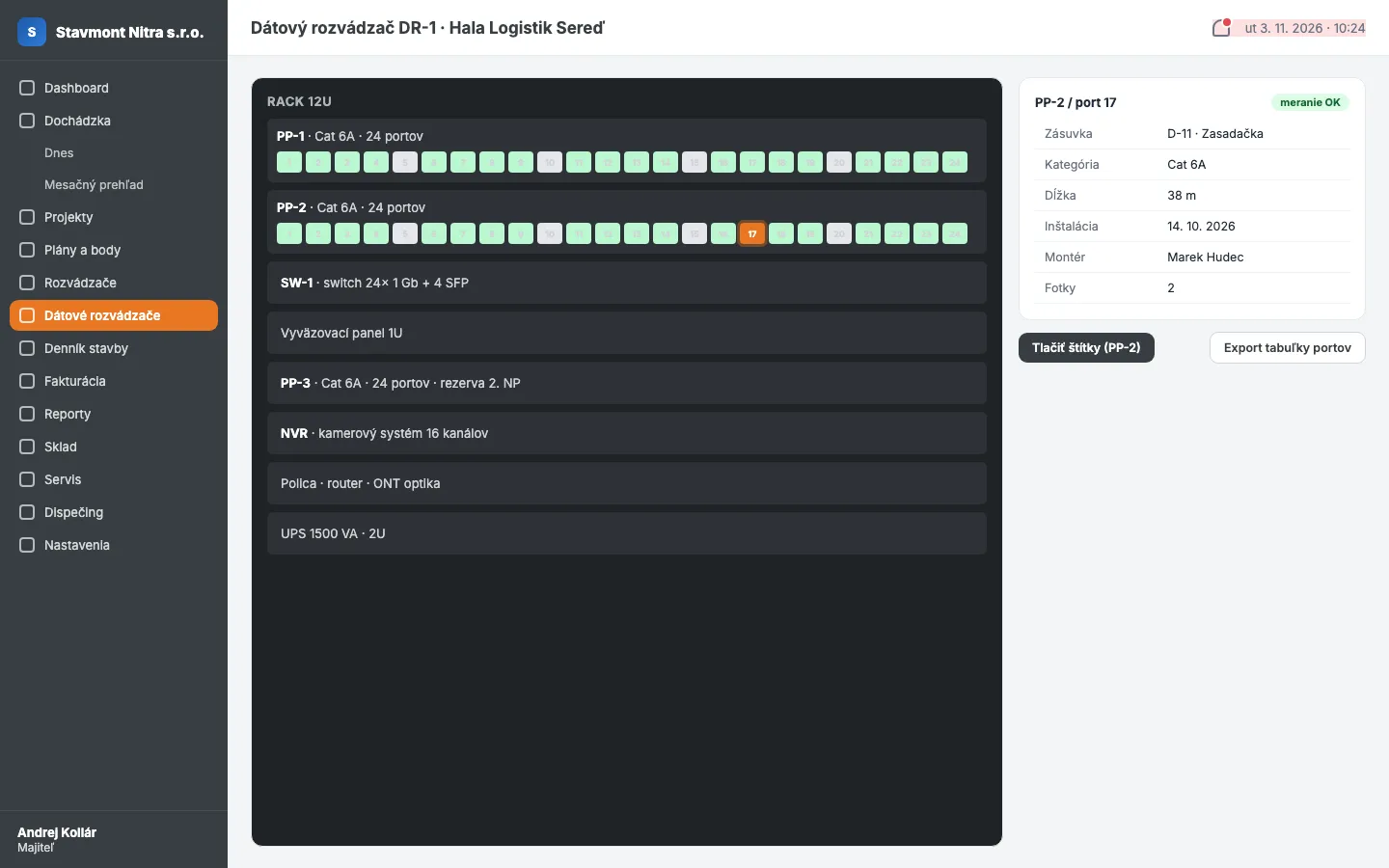
The same visual editor as for electrical boards, but for data cabinets. Every data point on the plan (RJ45 socket) is linked to its port on the patch panel. Open the cabinet and see which socket is on which port, then print the labels. Tap a data point in a room and see the patch panel, port, cable length, category, installation date and who installed it. Both ways, in one click.
The client's IT guy, two years later: "Which port is the socket in the meeting room on?" You, in the van, on your phone: tap the point. Port 17, patch panel PP-2, Cat 6A, 38 m, installed by Marek Hudec on 14 October 2026. Photo of the socket before the partition was closed, attached. The call took 40 seconds.
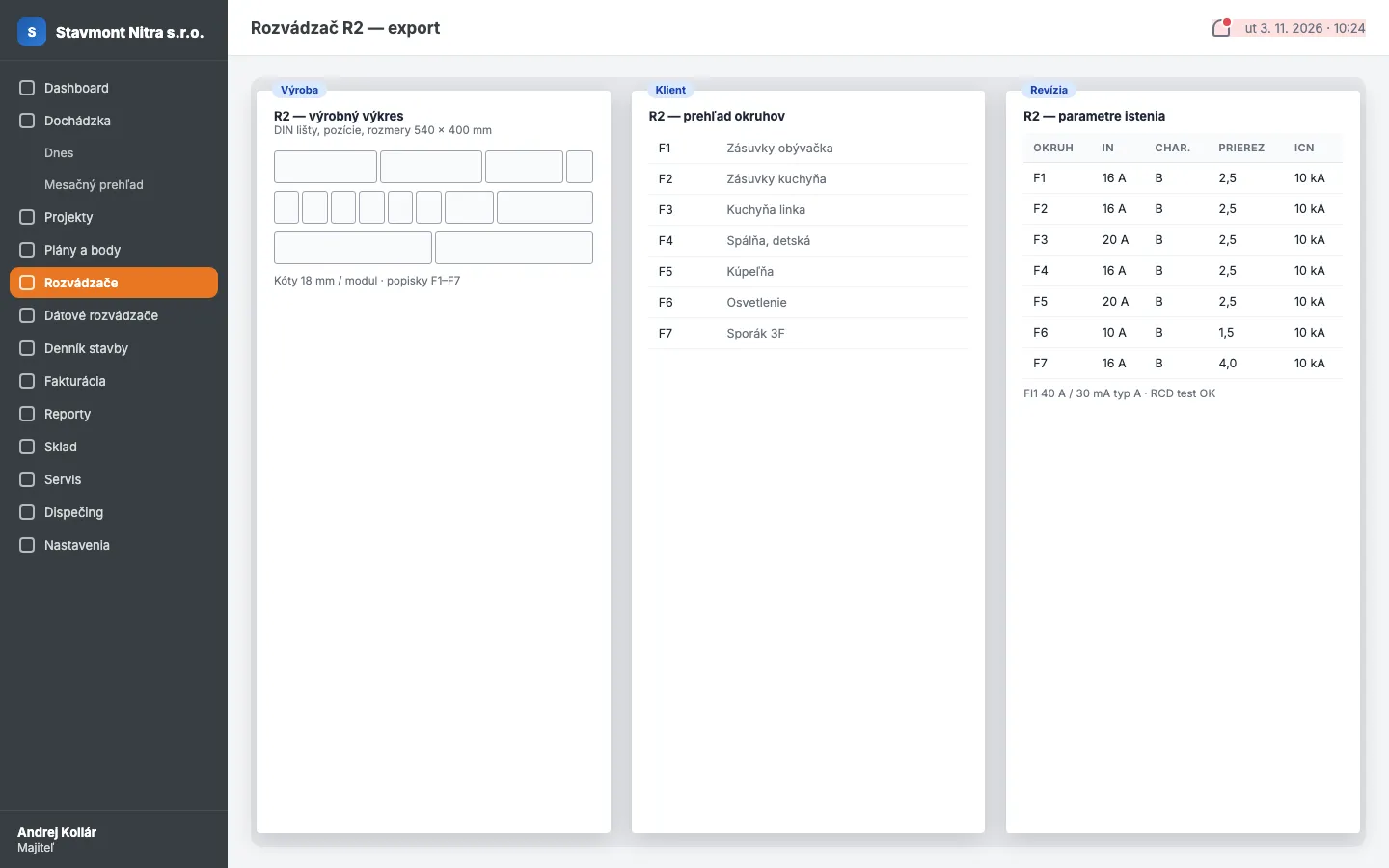
One schematic generates three documents. A PDF for the panel shop with layout and labels. A PDF for the client with a clear schematic and a list of circuits. A PDF for the inspection engineer with every parameter. Everyone gets what they need, and you don't draw it three times. Data cabinets get the same: a build drawing, a port map for the client, a technical table for the network administrator.
A system that knows everything but makes you go and look is just a better Excel. WiseBuilder tells you itself. Scheduled reports, notifications for whatever is on fire.
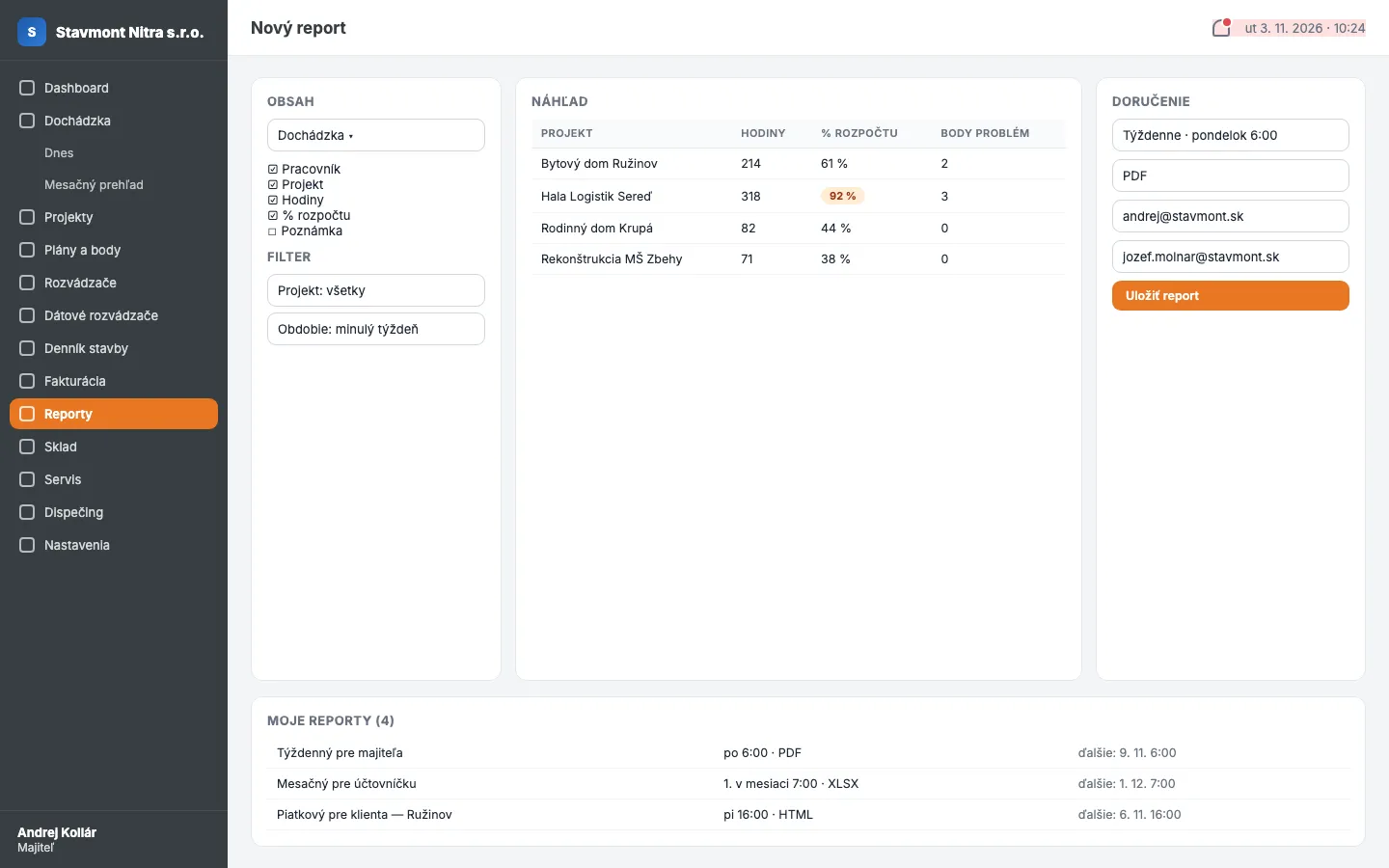
Every user builds their own reports: what goes in, which filter, which period, how often, in what format and to whom. Monday 6:00, weekly hours by project, PDF, to you. First of the month, invoices and payments, XLSX, to your accountant. Friday 16:00, site diary with photos, PDF, to the client. Set it, forget it, it arrives.
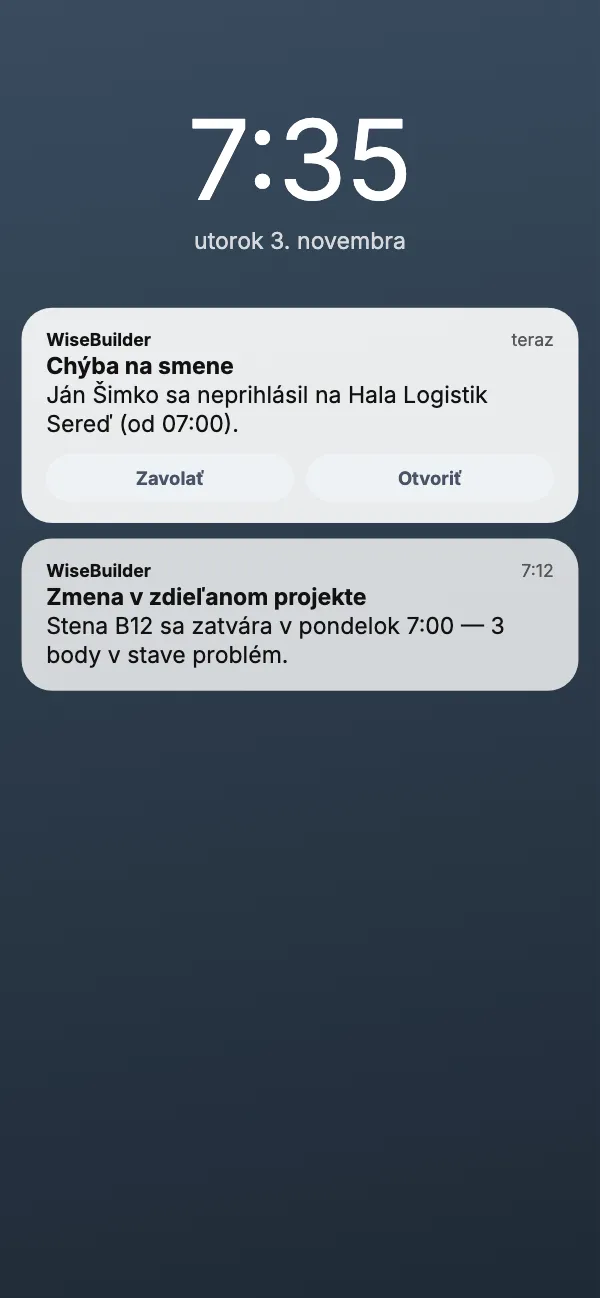
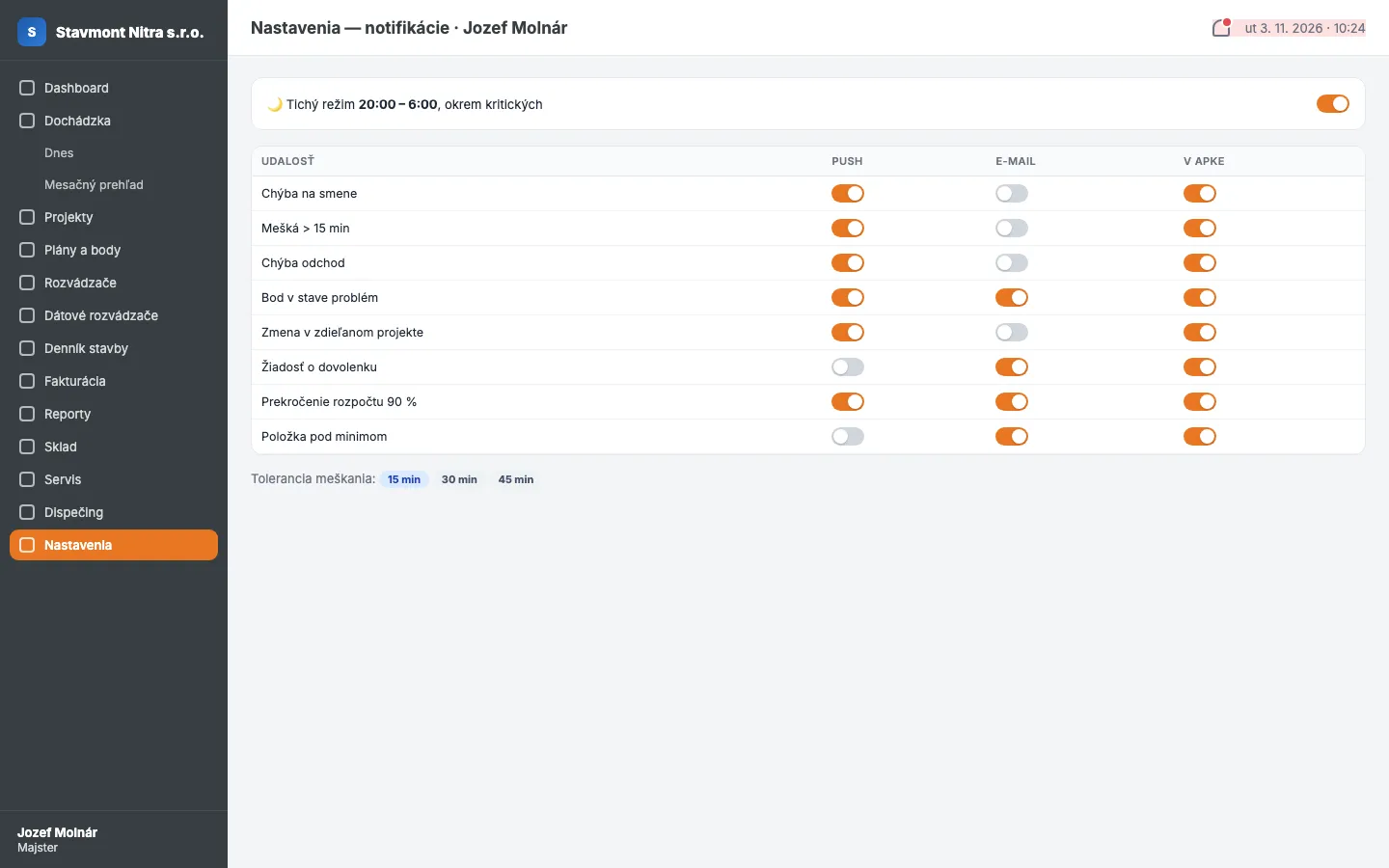
The shift starts at 7:00. At 7:35 the team lead gets a push on his phone: "Ján Šimko hasn't clocked in at Hala Logistik Sereď." Not at ten when the foreman calls. Not on Friday when you're putting the timesheet together. Right away, while you can still do something about it. Every user chooses which events they want and how: phone push, email, or just the bell in the app.
Tuesday, 7:35. Jozef Molnár, site foreman, is sitting in his van at another site. Buzz. "Missing from shift: Ján Šimko, Hala Logistik Sereď, since 07:00." Tap, he calls him. Ján overslept, he's there half an hour later.
Switch each module on or off depending on what your company does. A painter doesn't need distribution boards. An electrician doesn't need a paint store.
Stock levels, goods in, issue to project. Set a minimum quantity and the system notifies you when to order. Before someone on site runs out.
Short on materials? The order is created straight from the project or from points on the plan. Once delivered, it goes into stock and is assigned to the site.
The client reports a fault, you assign a technician, the technician sees the ticket on his phone along with the point's history on the plan. After the repair there's a record with photos and hours, and the invoice comes from that.
Where the €800 drill is, who has which van, when the test meter is due for calibration. Assign to a person or a project, with a full movement history.
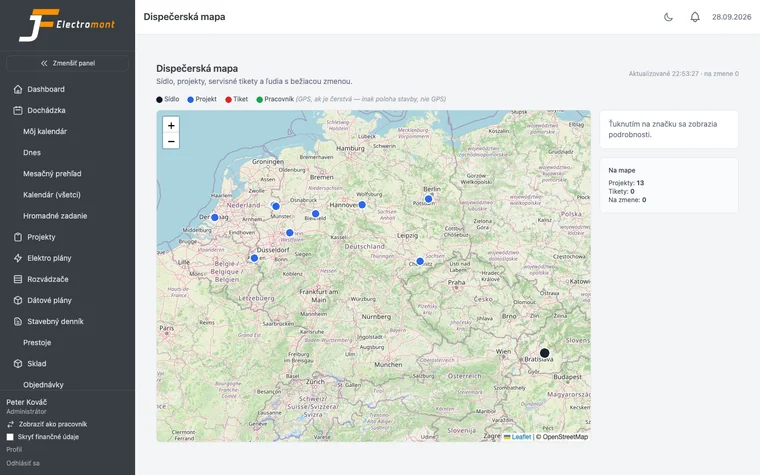
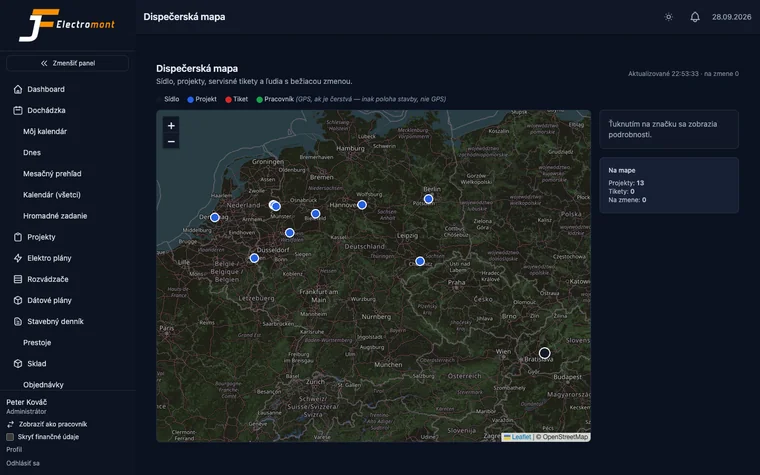
One map, every worker on shift, every site. Who's closest to a service call-out, you see at a glance.
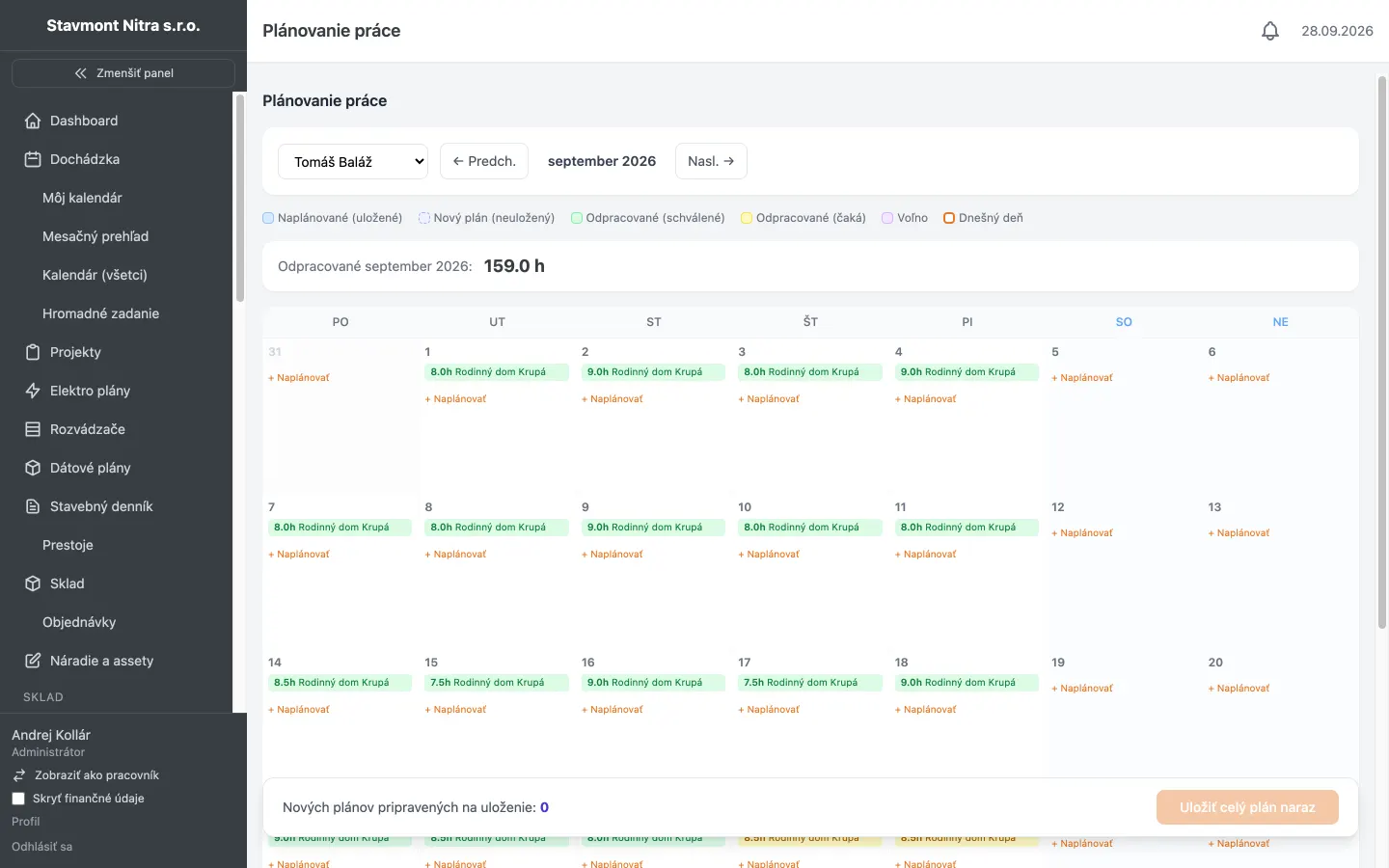
Who's on which site next week. Team capacity vs. promised deadlines. Even the partner company's schedule, if they share it. You see the conflict before the client tells you about it.
Weather, people on site, work done, photos. An entry in 2 minutes from your phone. In a dispute with a client, you have what you need. The general contractor can follow it live.
The worker requests it from his phone, you get a notification, you approve with one click. You see the absence calendar while planning, not on Monday morning.
Extra work gets reported, approved and invoiced. Not "but I told you on site".
Got two limited companies? One account, a switcher at the top. Each company has its own database and its own invoices, and you don't log in twice.
The foreman sees his team. Your accountant sees invoices. A worker sees himself. A partner sees only what's shared. You set exactly who can do what, feature by feature.
company.wisebuilder.cloud or your own domain. Your logo on invoices, reports and in the app. The client sees you, not us.
App interface currently available in Slovak. English localization coming Q4 2026.
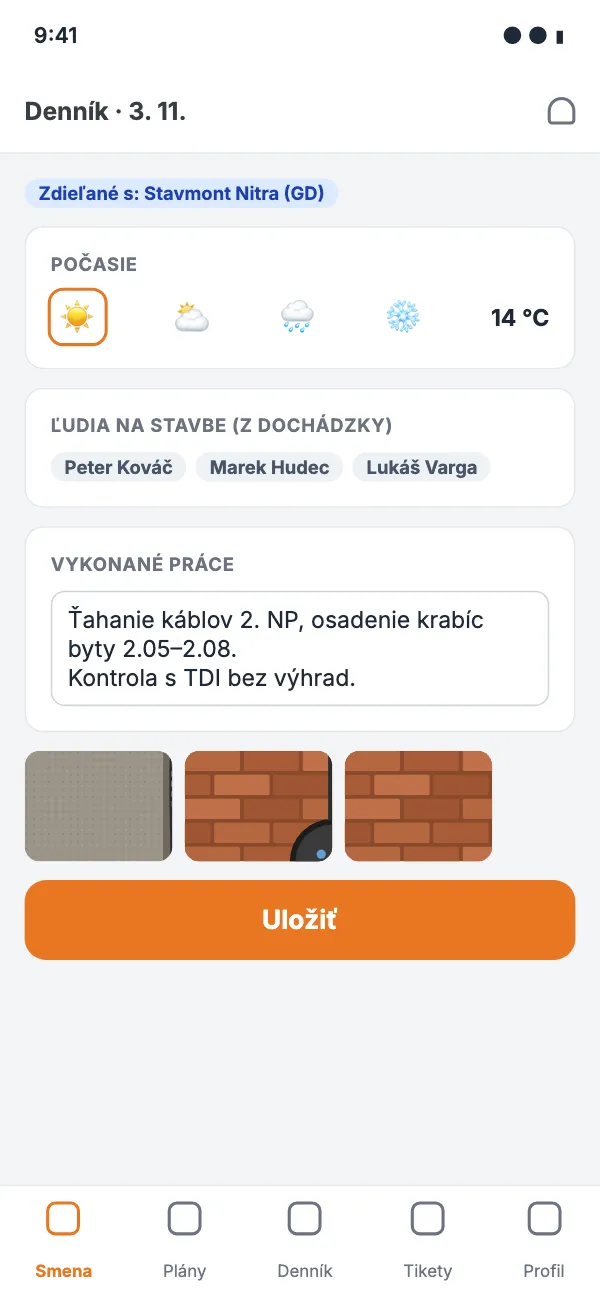
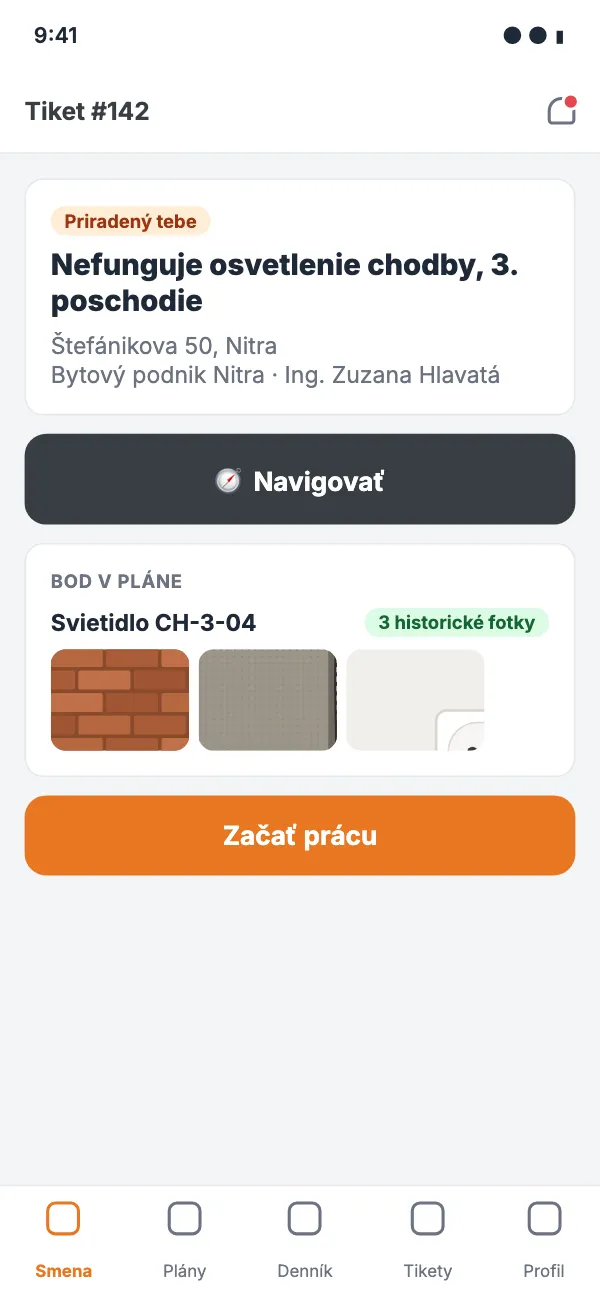
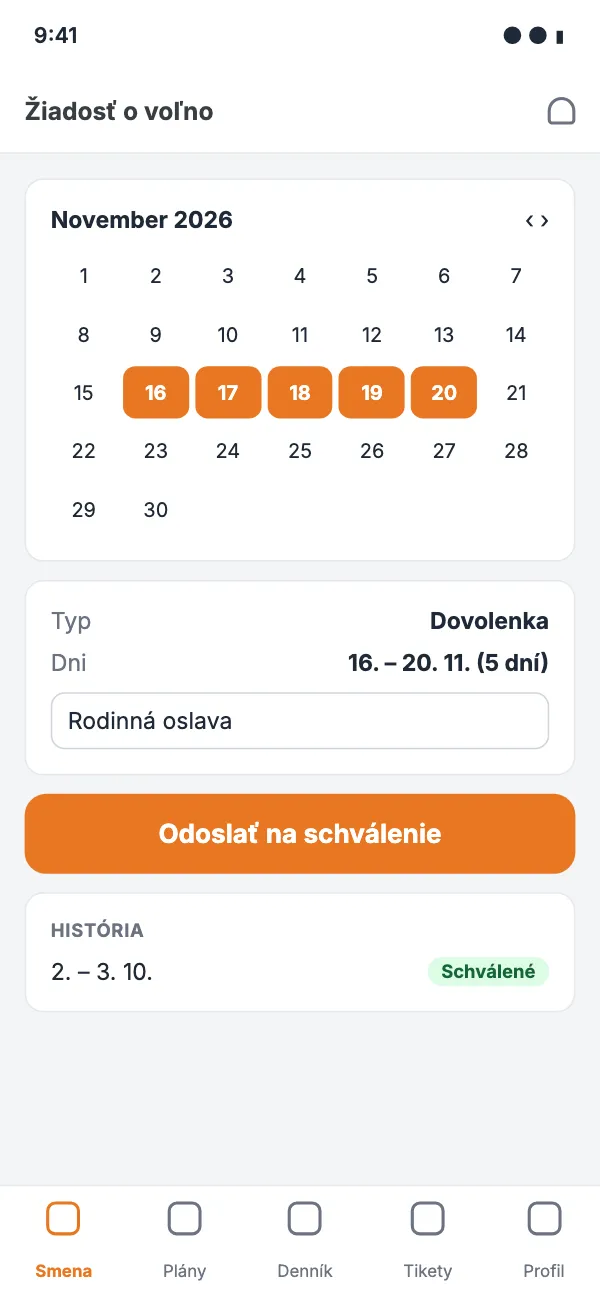
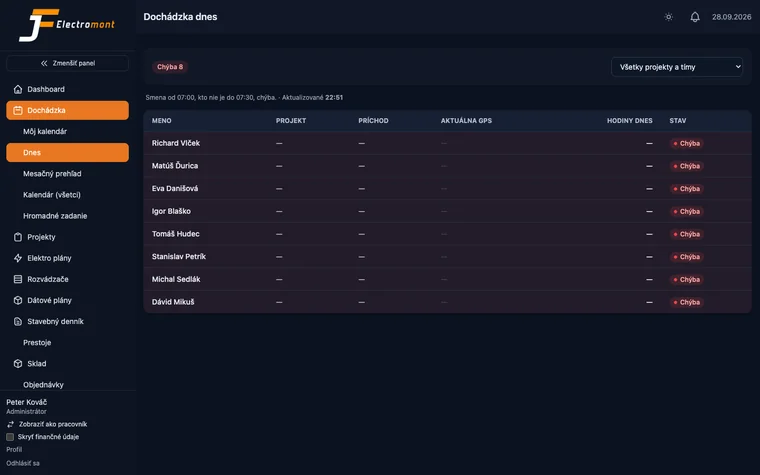
No mock-ups. Screenshots from the live operations of JF Electromont — a company that uses WiseBuilder every day. Light and dark mode, on desktop and on mobile. Names, addresses and amounts have been pseudonymised.
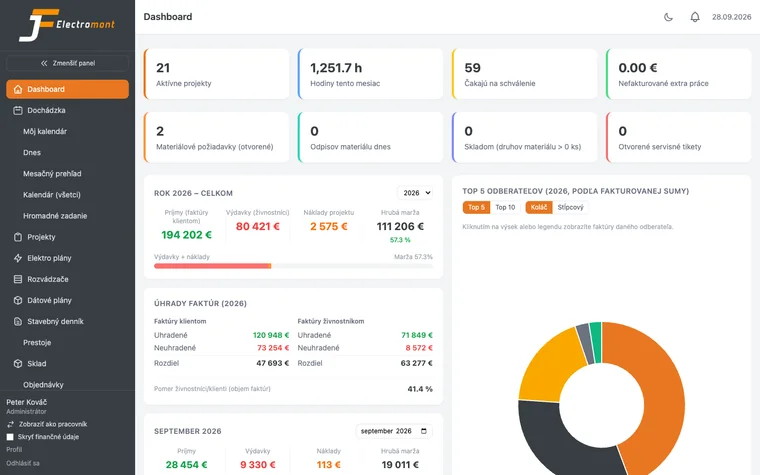
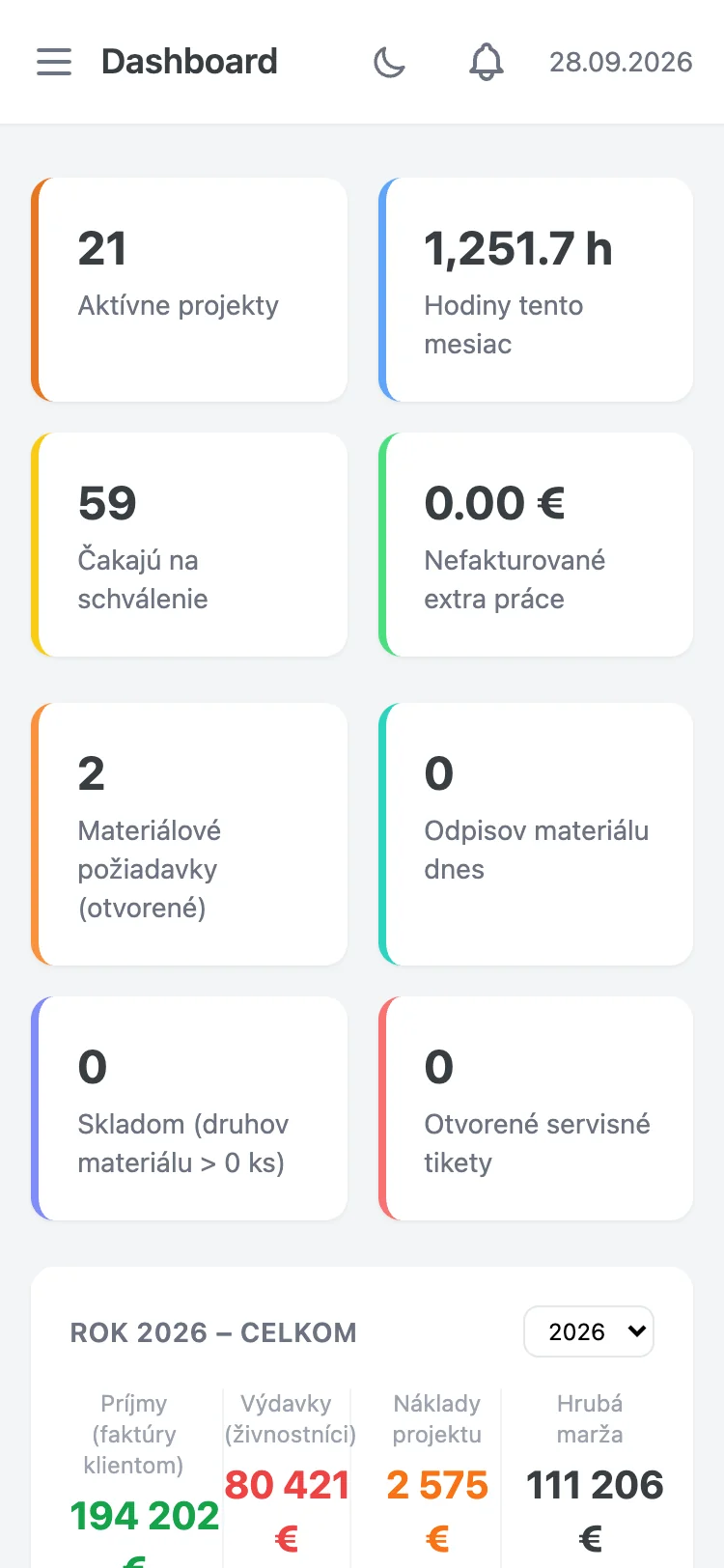
App interface currently available in Slovak. English localization coming Q4 2026.
Every company customises WiseBuilder itself: upload a logo and pick the primary colour, accent colour, secondary colour and the dark mode background. The change shows up immediately across the whole app, on the login page, and on PDF invoices and plans. Your workers and clients see your company, not us.
No implementation project, no consultant, no two-day training. Most companies send their first invoice from the system within 7 days.
Name, company registration number, email. Within two minutes you have your own address, yourcompany.wisebuilder.cloud, and a separate database. Nothing to install.
Enter the site address and the system fills in the GPS. Upload a PDF floor plan. Add your workers and each one gets an SMS or email with a link to the app. Done in an afternoon, even with 40 people.
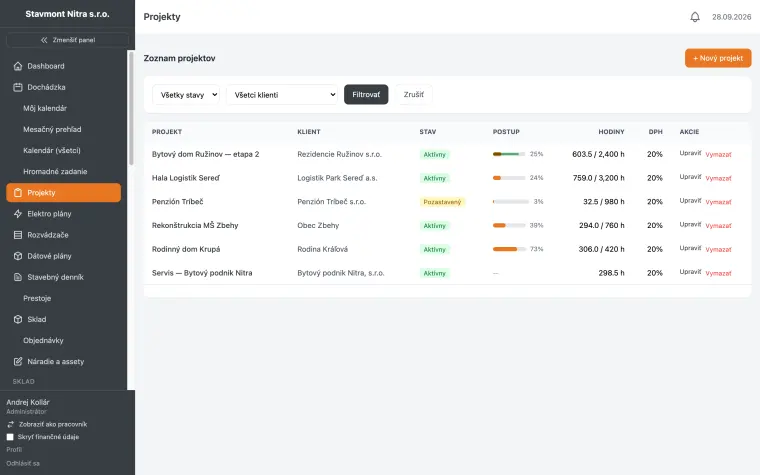
In the morning a worker opens the app, it recognises the site, he taps "Start shift". During the day he taps the plan where he installed a socket and takes a photo. In the evening, "End shift". That's all you teach him. If he can use Messenger, he can use WiseBuilder.
Bricklayer, plumber, general contractor. Tap "Invite partner" and choose what they see. From then on they know when you're coming, and you know when they're closing the wall.
Attendance, map, hours per project, material usage, status of points on the plan. From the office, from the van, from your holiday. Who didn't turn up this morning reaches you as a push at 7:35. From your holiday? Better not. But you can.
End of the month or end of a stage. Tap "Create invoice from project", check it, send it. Your accountant gets the monthly report automatically. You go home.
From 5 to 100 people in the field. If you have sites, people and invoices, it's for you. If there are other companies on your sites too, even more so.
Several sites at once, crews moving around, subcontractors with their own schedules. You see hours and costs for each site separately, and every subcontractor's site diary in one place.
Points on the plan with a photo before the wall is closed, distribution board schematics, inspection & testing PDFs. The system was born in an electrical company, so electrical is where it goes deepest.
Every RJ45 socket has its port on the patch panel, every port has a length, a category and an installer. The client gets a port map, and you get peace from phone calls two years later.
Service call-outs, spare parts from stock, an invoice right after the repair. The technician has everything on his phone, including a photo of the pipework before it was bricked in.
Quick jobs, lots of small invoices, people at different addresses. Attendance and invoicing without the stock and distribution boards you don't need. And when the electrician invites you into a project, you see where not to close the wall.
We built WiseBuilder for JF-Electromont s.r.o., an electrical installation company that needed to see its people, its sites and its invoices in one place. Every feature was tested in the field first, then fixed, then tested again.
The first company is ours. The second could be yours. We won't promise you hundreds of happy customers, because we don't have them yet. We promise you a system used every day by the company that built it for itself, and that has no wish to go back to Excel.
Your data doesn't sit in one big table with everyone else's. Every company has its own database. A problem at another customer can't touch you.
A partner company sees only the project, module and fields you shared with it. Invoices, payroll and attendance are never visible to them unless you decide otherwise. You revoke sharing with one click, and every share is logged: who, when, what.
It runs in a data centre in the European Union. GDPR applies and we comply with it. The data processing agreement is part of registration.
Every photo on a point in the plan has a timestamp, author and location. It can't be swapped for another one, only added to. In a dispute with a client or during an inspection, it's evidence, not opinion.
Attendance, projects, invoices, plans, points, photos, board schematics, port maps. Download it all as XLSX, CSV and PDF. If you leave, your data leaves with you, not into the void.
Automatic database backup every night, kept for 14 days. If someone deletes a project by mistake, we can bring it back.
Two paid plans, one trial. No setup fee, no lock-in, no "contact our sales team". The price is per company, not per worker, so you don't have to work out whether adding a temp is worth it. And a partner company you invite into a project pays nothing.
0 € / 30 days
no credit card
Everything in Pro, with no feature limits.
29 €24.17 € / month
excl. VAT, per month
For companies that need attendance, projects and invoices. Nothing more, nothing less.
79 €65.83 € / month
excl. VAT, per month
For companies that want the whole site in one system. Including the companies that aren't theirs.
More than 50 workers, or several companies under one account? Drop us a line and we'll work it out. No "enterprise pricing", just a normal conversation.
Simple: if you save 2 hours a month putting together attendance and invoices, Start has paid for itself. Pro at €79 pays for itself the first time you don't have to break open a wall because a photo shows you where the cable is. Or the first time you find a drill you would otherwise have bought again. Most companies get their money back in the first month.
No. Any paid plan can invite partners. If the invited company doesn't use WiseBuilder, it gets free partner access to only what you shared. If it does, it sees the project in its own account and pays only for its own plan. Collaboration never costs anything extra.
As many as you like. No limit on the number of reports, recipients or events. The only thing we limit is frequency: at most once a day for reports. Notifications arrive instantly.
Yes, any time. From Start to Pro instantly, the modules switch on right away. From Pro to Start from the next billing period; data from switched-off modules stays stored and exportable. Points on the plan and photos stay visible read-only even on Start.
Cancel in settings, no phone call and no notice period. You have full access until the end of the paid period. Then 30 days to export your data, then the database is deleted. Partners you invited lose access to your projects on the same day. No "give us a call and we'll talk you out of it".
No. The price is per company, up to the plan's worker limit. A temp for a week costs you nothing extra. Partner companies don't count towards the limit.
Included: the system, updates, backups, support, subdomain, report emails, push notifications. Not included: nothing. If you want your own domain, you register it yourself (about €10–15 a year with a registrar), and we just connect it.
By card or by invoice and bank transfer. Monthly or yearly. You get the invoice automatically, with VAT, made out to your company.
If yours isn't here, write to us. A human answers, not a bot.
No. On a computer it runs in the browser (Chrome, Safari, Edge, Firefox). On a phone, the worker adds the app to the home screen with one tap and it works like any other app. No App Store, no IT technician.
Yes. Android and iPhone, same app, same features. Any phone from the last 5 years with GPS will do, which is every phone.
Clock-in and clock-out are saved on the phone and sent once there's signal. GPS works without mobile data, so the site is still recognised. Photos on points are also saved on the phone and uploaded later, with the original time they were taken. A basement with no signal isn't a problem, the data just goes out when you come back up.
Workers: 5 minutes. Two buttons, "Start shift" and "End shift", plus tapping the plan and taking a photo. Foremen: an hour to go through projects and attendance. Owner or accountant: an afternoon for invoicing, reports and exports. There are no paid training courses, because they aren't needed.
The foreman can log him in manually, with a note of who logged it. But honestly: a €120 phone pays for itself in the first month, when nobody has to retype timesheets.
Yes, if they're more than a few dozen metres apart. You set a radius for every site. If the radii overlap (two entrances of the same apartment block), the app offers both and the worker taps the right one.
He can, but he can't start a shift without it. The app says so clearly: "Turn on location so we can find the site". Location isn't tracked after the shift ends, so nobody has a reason to switch it off during the day.
Yes. The app added to the home screen receives push notifications on Android and on iPhone (iOS 16.4 and later). The worker allows them on first launch, just like with any other app. If they're turned off, the system sends an email instead.
XLSX and CSV export works with any of them. We're preparing direct integrations with Pohoda, Omega and Superfaktúra. If you use something else, tell us which and we'll take a look. And if your accountant doesn't even want to export, set up a monthly report and it arrives on its own.
In the project, tap "Invite partner" and enter the company's email. Choose what you share: schedule, plan with points, diary, contacts, orders. The partner gets an email, clicks, and sees exactly what you gave them. If they already use WiseBuilder, the project appears alongside their own. If not, they get free partner access. The whole thing takes a minute.
No problem. They get free partner access to only the project and modules you shared with them. Nothing to install, nothing to pay, they log in through the link in the email. If they like it and want their own projects, they register their own company and keep the shared projects.
No, unless you switch it on yourself. Sharing is off for everything, and you switch it on module by module, field by field. Invoices, payroll, rates and attendance are always hidden by default. Every share is logged and you revoke it with one click.
Anyone in your company with access to that project. A partner company only if you share the plan with points including photos — that's a separate checkbox, you can also share the plan without photos. A client or inspection engineer: only if you give them read-only access, or send them the photos in a point's PDF export. Nobody outside sees them without your decision.
It can't be overwritten. The photo carries the timestamp, author and location from the moment it was taken. You can add another one (a newer state), not replace the old one. Only the company administrator can delete it, and the deletion stays in the point's history. That's why it works as evidence in an inspection or a dispute.
Yes, it's one plan. On the same PDF floor plan you place electrical points (socket, switch, light) and data points (RJ45, data cabinet). Each type has its own colour and layer that you can switch on or off. An electrical point is linked to a circuit in the distribution board, a data point to a port on the patch panel. One plan, two tracks, each traceable in one click.
Patch panel, port, cable length, category (Cat 5e / 6 / 6A / fibre), installation date, who installed it, timestamped photos and the test result, if you attached one. The same from the other side: tap a port in the cabinet and you see the socket in the room.
Yourself, without us. Pick the module, columns, filter, period, frequency, format (PDF / XLSX / inline HTML in the email) and recipients. You see a preview before saving. If you need something the report builder doesn't have, write to us and we'll add it for everyone.
The worker himself, his foreman and people with the manager role you assign. Nobody else, not even a partner company. As the operator, we don't access the data unless you ask us to while solving a problem. After the shift ends, location isn't recorded at all.
Yes. The servers are in the EU, you sign the data processing agreement at registration, GPS is recorded only during a shift, and workers have access to their own data. When you share a project with a partner, your workers' personal data isn't shared unless you switch on the "contacts" module and pick specific people. We recommend having your workers sign a notice on location processing; we'll give you a template.
Any time. Every module exports to XLSX, CSV or PDF, including points on the plan with photos and port maps. If you cancel, you have 30 days to download everything. We're not a prison with a monthly fee.
On servers in the EU (Hetzner, Germany). Every company has its own separate database. Backups run automatically every night and we keep them for 14 days.
You get 90 days' notice and a full export of all your data. Nothing disappears overnight. But we're not planning on it: the system runs our own company, so we need it just as much as you do.
No. Monthly, no lock-in. The yearly plan is cheaper, but nobody pushes you into it.
No. One person has one account and switches between companies. Each company has its own database and its own invoicing, but you don't log in three times. The same goes for partner projects: you see them in the same account.
Slovak today. We're finishing English, German and Dutch, coming in Q4 2026, and every user will pick their language in their profile. If your crew needs another language (for example Hungarian, Czech or Ukrainian), tell us which one.
Registration opens at the end of October 2026. Sign up now and you get a trial extended to 60 days, the Start or Pro price locked for the first year, and a direct line to the people building the system. We won't offer this later, because we won't be able to keep up.
Launching at the end of October 2026. Until then WiseBuilder runs in beta in our own company and we keep finishing features. Before registration opens, we'll tell you exactly what's ready.
.jpeg)